Discover practical insights on unpacking, prepping, and integrating the Blackmagic Production Camera 4K into your video production workflow. Learn what to plan, capture, protect,
Helps producers and production teams decide how to integrate the Blackmagic Production Camera 4K into their shoot planning and post-production workflow.
Why the Blackmagic Production Camera 4K Still Matters in Modern Production
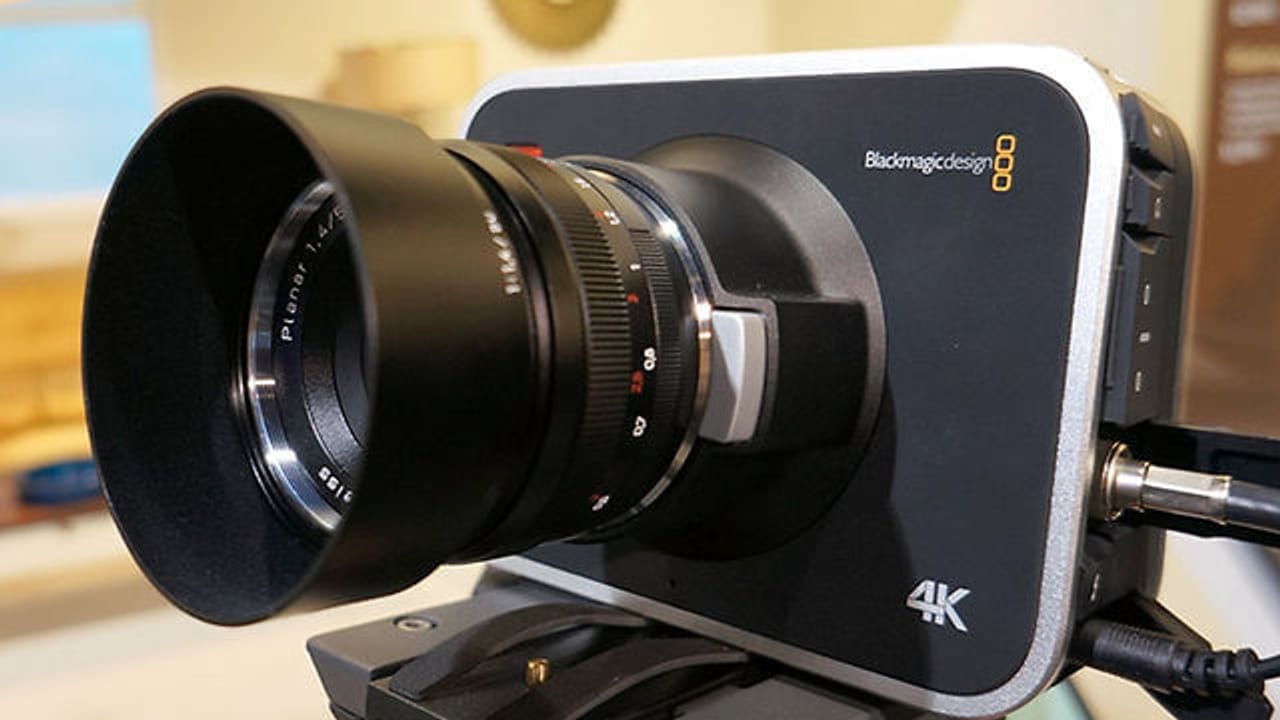
The Blackmagic Production Camera 4K remains a popular choice for filmmakers and content producers looking for high-quality 4K RAW and ProRes capture at a competitive price point. Its Super 35 sensor and global shutter deliver cinematic image quality with minimal rolling shutter distortion, making it ideal for controlled lighting environments and narrative shoots. Understanding its capabilities upfront helps you plan your shoot around its strengths and limitations, ensuring you capture footage that works seamlessly through post-production.
What to Expect When Unboxing and Setting Up the Camera
Unboxing the Blackmagic Production Camera 4K is just the start. Inside the box, you’ll find the camera body, lens mount options (EF or PL), power supplies, and cables. Before rolling, confirm you have compatible lenses, media cards (preferably CFast 2.0 for RAW recording), and batteries or AC power solutions. The camera’s touchscreen interface requires familiarization—take time to update firmware and configure recording settings to match your project’s delivery specs. Planning these steps in pre-production avoids delays on set.
Protecting Your Footage: Media Management and Backup Strategies
Shooting 4K RAW or ProRes generates large files that demand disciplined media management. Use high-speed CFast cards formatted in-camera and have multiple cards ready to swap. Implement an on-set backup workflow immediately after each take—whether to a laptop or portable RAID system—to prevent data loss. Label cards clearly and track metadata like scene and take numbers to streamline post. Protecting your footage from shoot to post is critical to maintaining quality and avoiding costly reshoots.
Integrating Blackmagic Camera Footage into Post-Production
Footage from the Blackmagic Production Camera 4K integrates well with DaVinci Resolve, Blackmagic’s own color grading and editing software. Its RAW files offer extensive flexibility in color correction and exposure adjustments. When planning your post workflow, ensure your edit suite supports the camera’s codecs and that you have sufficient storage and processing power for 4K media. Early collaboration between production and post teams helps set expectations for color grading, LUT application, and delivery formats.
ECG’s Production Support for Blackmagic Camera Shoots
At ECG, we’ve worked extensively with the Blackmagic Production Camera 4K on diverse projects, from branded content to narrative shorts. Our services include pre-production planning to align camera capabilities with creative goals, on-set camera operation and media management, and post-production workflows optimized for Blackmagic RAW and ProRes files. Explore our portfolio to see how we’ve helped clients get the most from this camera, and contact us to discuss how we can support your next shoot.
FAQ
What media cards are recommended for the Blackmagic Production Camera 4K?
CFast 2.0 cards are recommended for recording Blackmagic RAW at 4K resolution due to their high write speeds. ProRes recording can also use high-speed SD cards, but CFast cards ensure reliable performance for RAW.
Can the Blackmagic Production Camera 4K be powered by batteries on set?
Yes, the camera supports external battery solutions via its DC input, but it does not have an internal battery. Many productions use V-mount or Gold Mount batteries with appropriate adapters for mobility.
How does footage from the Blackmagic Production Camera 4K integrate with editing software?
The camera’s RAW and ProRes files integrate natively with DaVinci Resolve, Adobe Premiere Pro, and Final Cut Pro. DaVinci Resolve offers the most comprehensive support for Blackmagic RAW, including advanced color grading and metadata handling.
What should a team understand about UNBOXING THE BLACKMAGIC PRODUCTION CAMERA 4K?
The useful takeaway is how audience, creative direction, production choices, post-production, approvals, and delivery needs shape the final video plan.
Where should this kind of project start?
Start with the goal, audience, deadline, where the finished piece needs to live, and the practical constraints that will affect creative and production decisions.
How can ECG help with the next step?
ECG can help connect the creative idea to production planning, filming, post-production, versioning, and delivery so the finished work fits the channel and the audience.